How Can You Automate Repetitive Business Tasks With AI?
Repetitive tasks quietly consume thousands of hours across businesses every year.
Employees copy information between systems. Sales teams sort through leads manually. Customer service teams answer similar questions repeatedly. Marketing teams prepare routine reports. Operations teams spend time moving information from emails, spreadsheets, forms, and documents into business software.
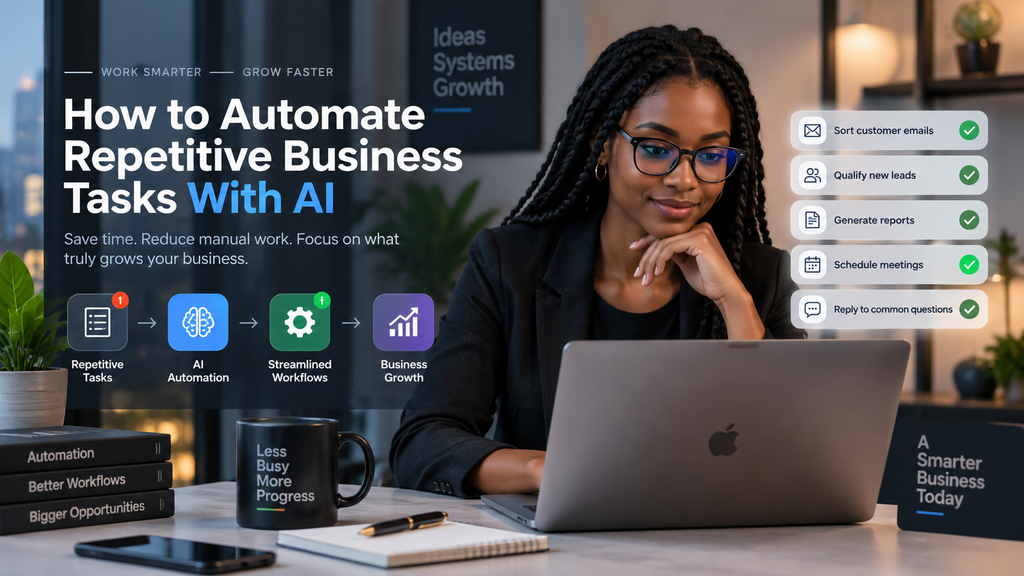
None of these tasks necessarily require human attention every time.
AI automation gives businesses a way to redesign these processes so technology handles repetitive work while employees focus on decisions, customers, strategy, and growth.
The goal is not to automate everything.
The goal is to automate the right work.
What Is AI Automation?
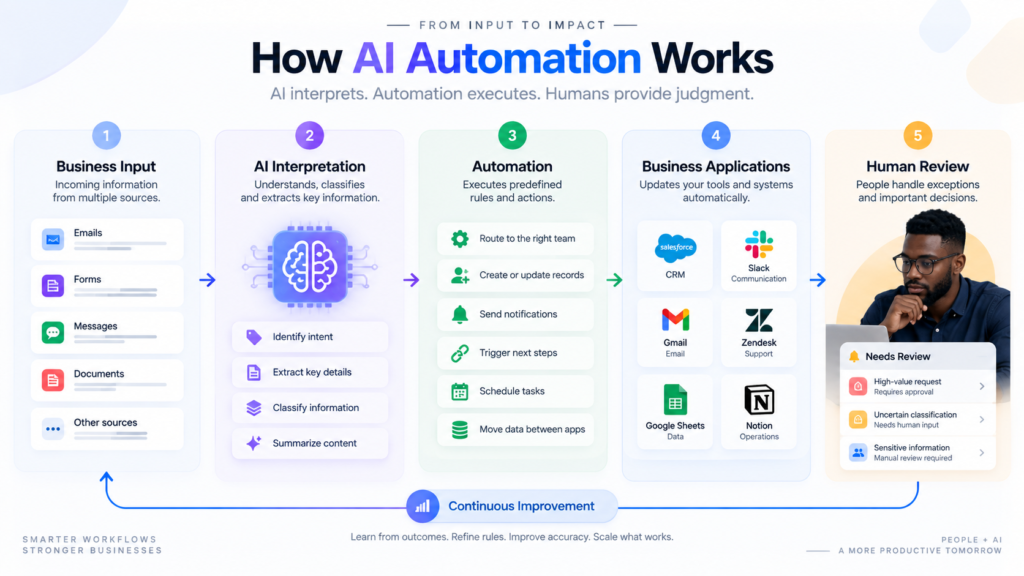
AI automation is the use of artificial intelligence within an automated workflow to interpret information, classify data, generate content, make recommendations, or trigger actions.
Traditional automation works best when a process follows clear rules.
For example:
New order → Payment confirmed → Send confirmation email
AI becomes useful when the workflow needs to understand information that is less structured.
For example:
New customer message → AI identifies the request → Determine priority → Route to the correct team → Create support ticket
This distinction matters.
Traditional automation is excellent at executing predictable instructions. AI is useful when a workflow needs to interpret language, extract information, summarize content, classify requests, or generate a response.
The strongest business workflows often combine both.
Why Should Businesses Automate Repetitive Tasks?
Repetitive work does more than consume employee time.
It creates operational friction.
When employees repeatedly perform low-value administrative tasks, they have less time for work that directly contributes to business growth.
Automation can help businesses:
- Reduce manual data entry.
- Speed up routine processes.
- Reduce avoidable human errors.
- Improve response times.
- Standardize recurring workflows.
- Give employees more time for high-value work.
- Connect different business applications.
- Improve operational visibility.
The opportunity is becoming increasingly significant as businesses adopt AI across their operations.
Microsoft’s Work Trend Index research has documented a growing shift toward AI agents and automated business processes, including the use of agents to handle complete workstreams. The broader trend is moving from using AI simply as an assistant toward designing workflows where AI participates directly in business processes.
That does not mean every company needs autonomous AI agents.
For many businesses, the biggest gains can come from automating a few repetitive processes properly.
Which Business Tasks Can You Automate With AI?
Not every task is suitable for AI automation.
The best candidates are usually frequent, repetitive, measurable, and relatively predictable.
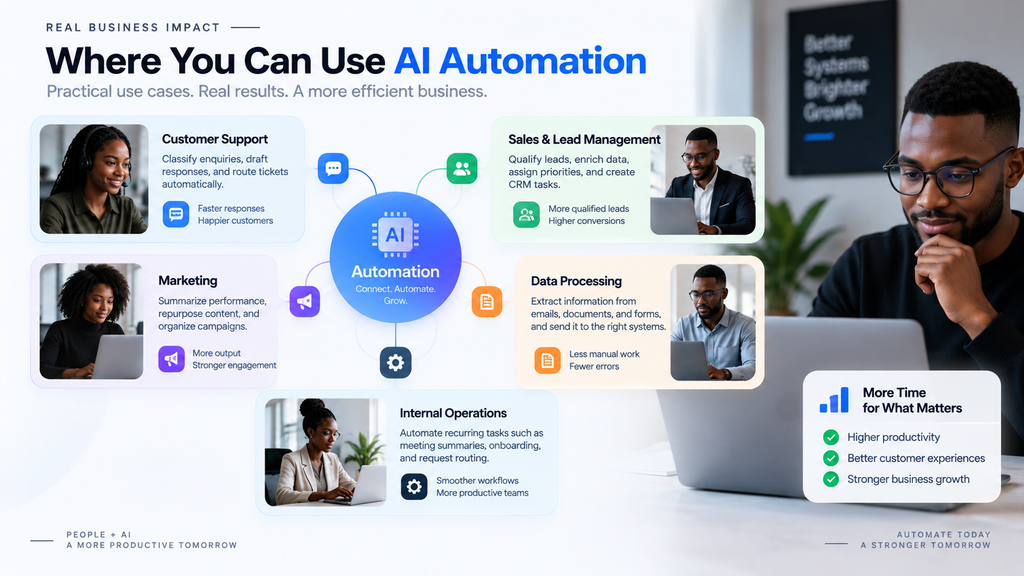
1. Customer Support
Customer service teams often receive similar questions throughout the day.
AI can help classify incoming requests, summarize conversations, identify intent, retrieve relevant information, and prepare draft responses.
For example:
Customer message → Identify intent → Check customer information → Categorize request → Create ticket → Route to team
A human employee can then handle complex or sensitive cases.
This creates a human-in-the-loop workflow rather than attempting to remove people completely.
2. Sales and Lead Qualification
Sales teams often spend significant time processing leads before having a meaningful conversation with a prospect.
An AI-powered workflow can:
- Read an incoming enquiry.
- Extract customer information.
- Identify the product or service requested.
- Classify the lead.
- Assign a priority.
- Route the lead to the appropriate salesperson.
- Create a CRM task.
- Draft a personalized follow-up.
The salesperson can then focus on the conversation instead of administrative preparation.
3. Marketing Operations
Marketing involves plenty of repetitive work that can be partially automated.
AI can help teams:
- Summarize campaign results.
- Categorize customer feedback.
- Generate first drafts.
- Repurpose long-form content.
- Organize content requests.
- Classify inbound enquiries.
- Create initial campaign variations.
Human review remains important for brand positioning, factual accuracy, messaging, and final approval.
4. Data Processing
Businesses receive information through forms, emails, PDFs, spreadsheets, and other sources.
AI can extract relevant information from unstructured content and pass structured data into another business system.
For example:
Invoice received → Extract relevant fields → Validate information → Send to accounting workflow → Flag exceptions
Instead of manually reading every document, employees can focus on exceptions that require attention.
5. Internal Operations
AI workflow automation can also support internal processes.
Examples include:
- Meeting summaries.
- Task creation.
- Employee onboarding.
- Document classification.
- Internal request routing.
- Recurring status reports.
- Information extraction.
- Notification workflows.
The important principle is to automate the process, not simply add another AI application to the technology stack.
How to Automate Repetitive Business Tasks With AI
The most effective approach starts with the existing business process.
Do not begin by asking, “Which AI tool should we buy?”
Begin by asking:
“Where are we wasting the most time?”
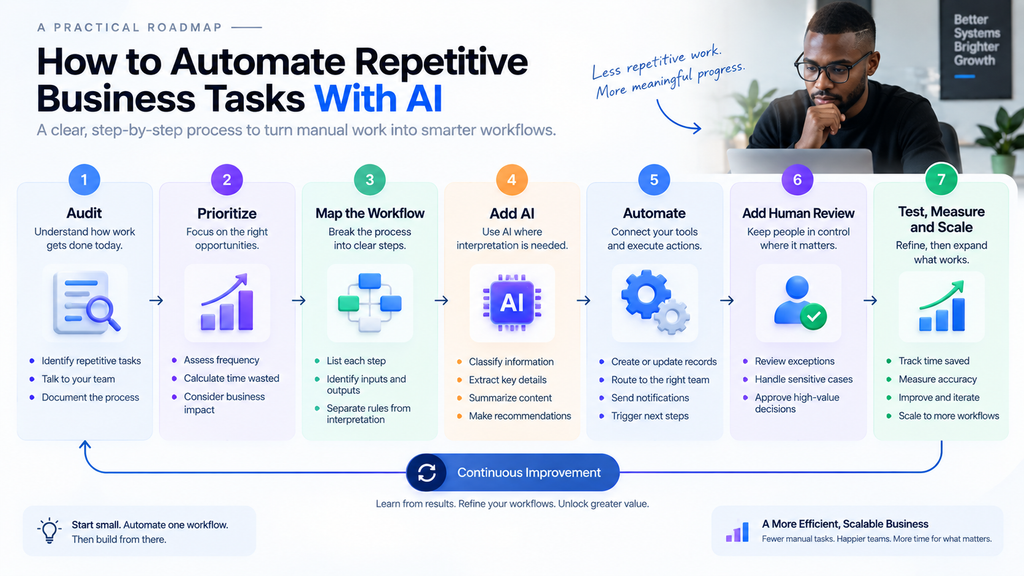
Step 1: Audit Your Existing Workflows
Document how work currently moves through the business.
Look for processes involving:
- Repeated data entry.
- Copy-and-paste work.
- Manual lead qualification.
- Repetitive customer emails.
- Recurring reports.
- Document processing.
- Manual approvals.
- Information moving between applications.
Talk to the people performing these tasks.
They often know exactly where the bottlenecks are.
Step 2: Identify High-Value Automation Opportunities
Prioritize tasks based on three factors:
Frequency × Time consumed × Business impact
A task that takes five minutes once a month is probably not your first automation target.
A task that takes 20 minutes and happens 30 times every day is a stronger candidate.
Also consider risk.
A repetitive process with a low cost of failure is usually easier to automate than one involving sensitive financial, legal, or customer decisions.
Step 3: Map the Workflow
Write the entire process from beginning to end.
For example:
New enquiry → Read message → Identify service → Check information → Assign salesperson → Create CRM task → Send acknowledgement
Now separate the workflow into two categories:
Rule-based steps
These can usually be handled by conventional automation.
Interpretation-based steps
These may benefit from AI.
For example, automatically creating a CRM record is a straightforward automation task.
Determining what a customer actually wants from an unstructured email may require AI.
This distinction keeps your automation architecture simpler.
Step 4: Decide Where AI Adds Value
Do not use AI simply because it is available.
AI can introduce additional complexity, cost, latency, and opportunities for incorrect outputs.
A better model is:
AI interprets.
Automation executes.
Humans handle judgment.
For example:
Customer email → AI classifies request → Automation routes request → CRM creates task → Human handles customer
This hybrid approach is often more practical than trying to make one AI system control everything.
Step 5: Add Human Approval
Some decisions should not be fully automated.
Consider human review for:
- High-value transactions.
- Sensitive customer complaints.
- Legal matters.
- Financial decisions.
- Employment-related decisions.
- Irreversible actions.
- Public-facing communications.
- Situations where an incorrect decision could create significant harm.
A well-designed workflow should define the exception path before deployment.
If the AI is uncertain, the process should know what happens next.
Step 6: Test Before Scaling
Start small.
Run the automated workflow against real or representative examples.
Measure:
- Processing time.
- Error rate.
- Manual interventions.
- Response time.
- Cost per transaction.
- Customer satisfaction.
- Employee time saved.
Do not judge the project simply by whether the AI produces impressive outputs.
Judge it by whether the business process performs better.
Step 7: Scale What Works
Once one workflow is reliable, move to the next bottleneck.
For example:
Lead capture → Lead qualification → Sales routing → Follow-up → CRM reporting
Instead of automating each process separately, you can eventually connect them into a larger operating workflow.
This creates a more scalable approach to business process automation.
What Should You Not Automate With AI?
Automation is not automatically beneficial.
Avoid automating a process simply because technology makes it possible.
Be cautious when a task:
- Requires deep empathy.
- Involves sensitive personal information.
- Has serious consequences if incorrect.
- Changes frequently.
- Requires strategic judgment.
- Happens too rarely to justify automation.
- Cannot be measured reliably.
There is another important rule:
Do not automate a broken process.
If a workflow is inefficient because responsibilities are unclear, automating it may simply make the inefficiency happen faster.
Fix the process first.
Then automate it.
What Should You Not Automate With AI?
Automation is not automatically beneficial.
Avoid automating a process simply because technology makes it possible.
Be cautious when a task:
- Requires deep empathy.
- Involves sensitive personal information.
- Has serious consequences if incorrect.
- Changes frequently.
- Requires strategic judgment.
- Happens too rarely to justify automation.
- Cannot be measured reliably.
There is another important rule:
Do not automate a broken process.
If a workflow is inefficient because responsibilities are unclear, automating it may simply make the inefficiency happen faster.
Fix the process first.
Then automate it.
AI Automation and Your Wider Digital Strategy
AI automation should not exist as an isolated technology project.
It should support broader business objectives.
For example, automating lead qualification can help your sales team respond faster. But if your website fails to convert those leads, the automation is only solving one part of the problem.
That is why this article connects with the wider content strategy around e-commerce optimization, app development, and SEO/GEO.
If your business generates traffic but struggles to turn visitors into customers, our upcoming guide on how to improve e-commerce conversion rates will address the next part of the customer journey.
If automation reveals that your business needs a custom digital product, our guide on mobile app development costs in 2026 will explain the major factors that influence development investment.
And if your business has strong products and efficient operations but struggles to attract organic traffic, our guide on why websites fail to rank on Google will cover technical SEO, content, search intent, and GEO.
These areas work together.
Automation improves operations.
Digital products improve customer experiences.
SEO and GEO improve discoverability.
Conversion optimization turns attention into revenue.
How Much Can AI Automation Save a Business?
There is no universal percentage.
The impact depends on the workflow, transaction volume, data quality, integration requirements, human review, and implementation quality.
That is why businesses should avoid generic promises such as “AI will save 50% of your time.”
Instead, establish a baseline.
For example:
Before automation:
100 customer enquiries require four hours of manual sorting and routing.
After automation:
AI classifies the enquiries, automation routes them, and employees review exceptions.
The meaningful result is the difference in processing time, response speed, errors, and employee workload.
Measure the actual workflow.
That is how you determine whether automation is delivering a return.
What Is the Best Way to Start AI Automation?
You do not need to automate the entire business.
Start with one process.
A practical framework is:
1. Find the bottleneck.
Identify repetitive work that consumes meaningful time.
2. Document the process.
Understand every step before changing it.
3. Separate rules from judgment.
Determine which steps need traditional automation and which require AI.
4. Build a small workflow.
Solve one clearly defined problem.
5. Add human oversight.
Create approval and exception paths.
6. Measure performance.
Compare the automated process against the original.
7. Improve before expanding.
Fix reliability issues before applying the approach to more workflows.
The objective is not to build the most sophisticated AI system.
The objective is to build a reliable business process that produces a measurable result.
Frequently Asked Questions
What is the easiest business task to automate with AI?
Start with repetitive, high-volume tasks such as customer-support classification, lead qualification, document summarization, information extraction, or routine reporting.
Can small businesses use AI automation?
Yes. Small businesses can start with one workflow and connect the software they already use. The first automation does not need to be complex.
Do I need developers to automate business tasks?
Not always. Low-code and no-code tools can support many workflows. Custom software development may become necessary when the business requires complex integrations, proprietary systems, advanced security, or highly specialized functionality.
Is AI automation safe for customer data?
Safety depends on the tools, architecture, permissions, data practices, security controls, and governance used by the business. Sensitive information should be handled according to applicable privacy and security requirements.
Should AI replace employees?
Not necessarily.
The better question is:
Which parts of the workflow should AI handle, which should automation handle, and which should remain human-led?
The strongest implementations use technology to remove repetitive work while allowing people to focus on judgment, relationships, creativity, and strategy.
What Should Your Business Automate Next?
The best automation opportunity may already exist inside your business.
Look for the task employees repeat every day.
The spreadsheet they constantly update.
The emails they repeatedly write.
The leads they manually sort.
The reports they prepare every week.
The information they repeatedly move from one application to another.
Start there.
AI automation is not about adding more technology to your business. It is about creating a better way for work to move through your business.
Start with one workflow.
Measure the result.
Then build from there.
Ready to identify the right processes for automation and build an AI-powered workflow around your existing business systems? Contact our team to discuss your automation requirements.
Related Articles
- How to Improve Your E-commerce Conversion Rate
- How Much Does It Cost to Build a Mobile App in 2026?
- Why Is My Website Not Ranking on Google?